---
title: Using Delete or Patching to link multiple Dataflows
description: Patching and the Delete Schema a potent features within the Data Manager, with a number of common use cases - however, employing them can seem somewhat complex to those unfamiliar with their applicati
---
[Skip to content](https://content.raptorservices.com/help-center/using-delete-or-patching-to-link-multiple-dataflows#main-content)
![raptor-qntm-logo\_horizontal\_gradient.png\]](https://content.raptorservices.com/hs-fs/hubfs/raptor-qntm-logo_horizontal_gradient.png?height=40&name=raptor-qntm-logo_horizontal_gradient.png)
Open main navigation
Close main navigation
- [Go to raptorservices.com](https://raptorservices.com/)
[Go to raptorservices.com](https://raptorservices.com/)
Hello. How can we help you?
- There are no suggestions because the search field is empty.
1. [Help Center](https://content.raptorservices.com/help-center?hsLang=en)
2. [Data Management](https://content.raptorservices.com/help-center/data-management?hsLang=en)
3. [The Data Manager](https://content.raptorservices.com/help-center/data-management?hsLang=en#the-data-manager)
# Using Delete or Patching to link multiple Dataflows
**Patching** and the **Delete** **Schema** a potent features within the Data Manager, with a number of common use cases - however, employing them can seem somewhat complex to those unfamiliar with their applications. However, they are in truth rather simple to set up - and this guide will provide three specific and detailed examples of how to do it.
### Example 1: Collating PersonData from multiple sources
In this example, we will be focusing on PersonData - that is, a database of personal information, such as customer-lists. Assume that you have two different sources of information about the same group of people - or, alternately, two different groups with significant overlap - that each provides different sets of information. This could, for instance, be customer-information from an electronic storefront, and data from a customer-club or bonus-scheme that some of those customers have signed up for.
The first step is to find, or create, an appropriate Schema. It should target the CDP (Customer Data Platform), be of the Persondata type, and use a PersonIdentifier that is available in both datasets - while having no other Required Columns. The other columns should cover all the relevant data available from both sources. If you do not have a suitable one available, you will have to create it - the [Schemas & Sources](https://content.raptorservices.com/help-center/tools/datamanager/schemas-sources?hsLang=en) guide can help you there. Below, you can see a mockup of such a schema.
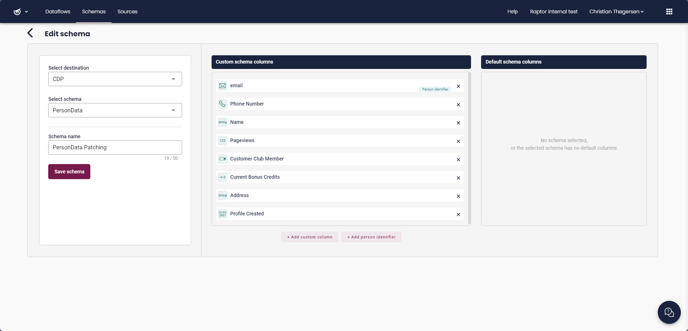
In this example, the storefront has the customer's email, pageviews, current bonus credits, and the date of profile creation. The customer club data includes email, phone-number, name and address, as well as - inherently - the fact that they *are* customer club members.
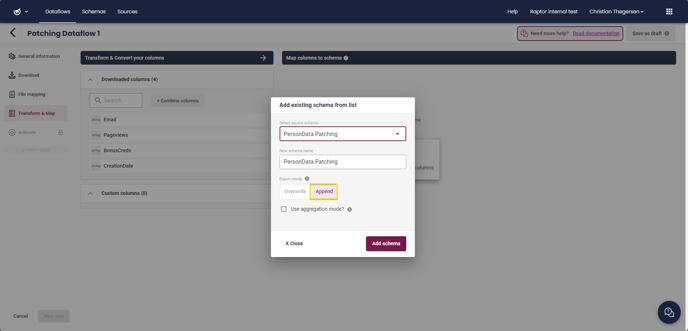
The next step, then, is to create the Dataflows. A detailed guide to this process can be found [HERE](https://content.raptorservices.com/help-center/tools/datamanager/introduction-to-the-data-manager?hsLang=en) - in this guide, we will be focusing on the parts relevant to the **Patching** process. So, simply Create a Dataflow, selecting the CDP as destination, and using the electronic storefront as the Source. Once you reach the **Transform & Map** step, you then **Add Existing Schema**, and select the Schema we created earlier. It is crucial that, at this stage, you select the **Append** option for the Schema. **Append** is essentially how you enable **Patching.**
****
Once this Schema has been selected, you can proceed with mapping all the available columns, using the **Convert** and **Transform** features as normal.
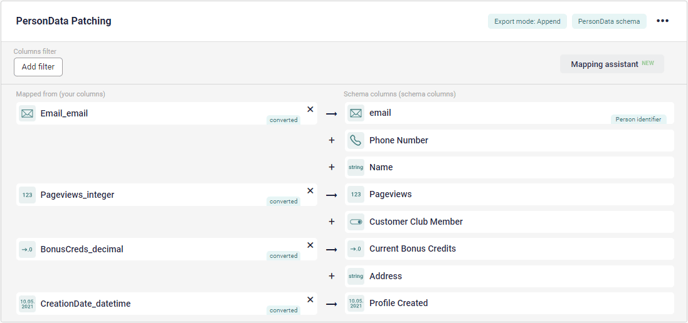
Finish creating the Dataflow, setting a suitable schedule and activating it. Now, create a *new* dataflow. Once again, the destination for this one will be the CDP, but the datasource should be the Customer Club database. At **Transform & Map**, select and activate the same schema as last time, again using the **Append** setting.
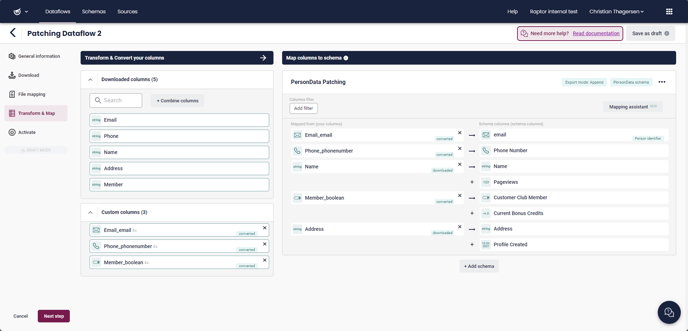
And that is, essentially, it. Once this dataflow has been scheduled and activated, the **Patching** will automatically follow - the system does the rest. As long as the same Schema is used, and the Person Identifier matches, the information will be collected - and the **Append** setting ensures that the individual dataflows play nice with each other, rather than overwtiting existing information with blank columns. Indeed, while this example used two sources, there's nothing stopping you from doing the same thing with three, four or more.
### Example 2: Regular updates for ProductCatalog information
This example focuses on Product Catalogs, and assumes that you have a general - and rather large - product database. This database regularly sees changes to sales-price due to various special sales or other offers, as well as in-stock status being updated based on information from electronic of physical storefronts, but the rest of the information is largely static - changing only when new products are added or old ones removed from circulation. You want to keep the sale price and stock status data up to date in the system, but if you try to simply run a single Dataflow from your Product Catalog, with an interval of 'every hour' or similar, you'll quickly find that the sheer quantity of data being uploaded on each occasion renders the process impractical - each run of the Dataflow takes long enough that it's never *really* up to date anyway, and in the process, the system is severely taxed. The solution is **Patching!**
The first step is to create a basic ProductCatalog Dataflow. In the vast majority of cases, you'll want to target the **Recommendation Engine** with the Dataflow, which means you'll essentially be locked into the default Product Catalog Schema - but, you *can* use this with the **Search** feature too, in which case a customized Schema is an option. As long as the Schema contains something like a ProductNumber or ProductID, and no other **Required** columns, the Patching will work regardless.
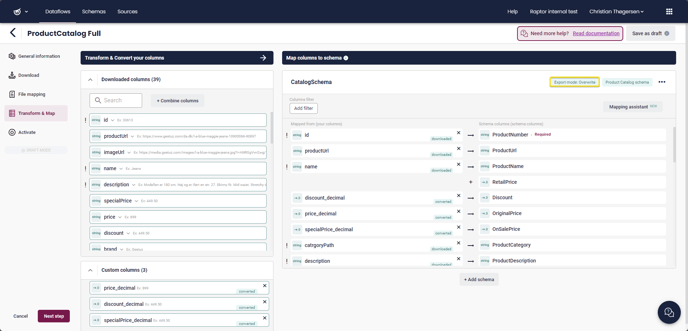
Create a Dataflow as normal. As in **Example 1**, the full [Dataflow Creation Guide](https://content.raptorservices.com/help-center/tools/datamanager/introduction-to-the-data-manager?hsLang=en) can provide further instructions if necessary, but the important thing here is simply to pick the appropriate target - **Recommendation Engine** or **Search** - in the first step, and then picking the **Overwrite** option when selecting the Schema. Map as much information onto the schema as possible. Then, in the final step, schedule it to run **Once per day** - ideally late at night, when traffic is otherwise low. This will be plenty to keep the overall content of the Product Catalog current.
Next, create a new Dataflow. You'll want to use the same source, same destination, and same Schema - but when you add that Schema, you select **Append**.
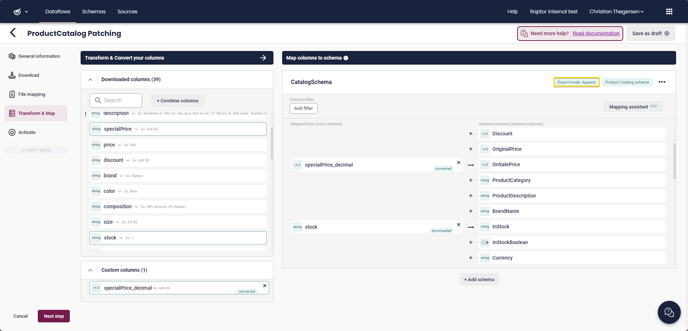
This time, you want to map only the information that needs to be updated frequently, along with the mandatory ProductNumber. In this case, that's OnSalePrice and an InStock number, but it could theoretically be anything that is subject to frequent changes.
Now, finalize and Activate this Dataflow, setting it to run at tight intervals - Once Every 1 hour, 2 hours, 4 hours, whatever seems appropriate under the circumstances. Each run will transmit only the mapped lines, making them quick to run and light in terms of system-load - and thanks to **Patching**, those two or three Columns you selected will simply be slotted neatly into the existing ProductCatalog without impacting the rest of the information there.
There are, of course, many other ways to utilize **Patching** - every business is unique and has its own needs - but hopefully these two examples can illustrate the broad possibilities it represents, and provide ideas for how to integrate it into your company's data-management strategy!
### Example 3: Removing products from Search as they go out of stock
This example focuses on Site Search, and like Example 2, assumes that you have a large Product Database, linked to Raptor's Site Search. You will, of course, want your Search Results to be up to date - so, a regular Dataflow will likely already have been established for that purpose. This, of course, is as simple as building an Append-type Dataflow according to the [Dataflow Guide](https://content.raptorservices.com/help-center/tools/datamanager/introduction-to-the-data-manager?hsLang=en), with **Search** as the destination.
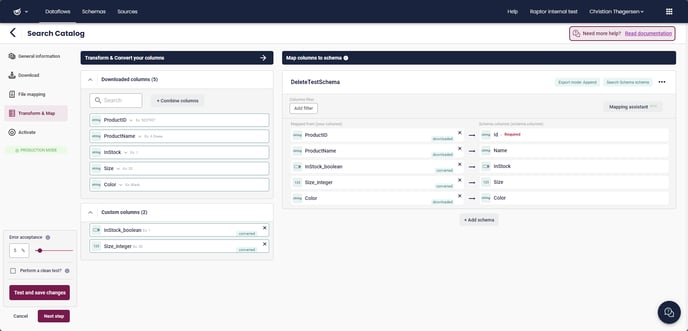
You can then use this to create a Search-Index in the [Site Search](https://content.raptorservices.com/help-center/introduction-to-site-search?hsLang=en) section. You'll likely want to run this Dataflow on a daily basis, to keep the search-results up-to-date. You may even want to use **Patching** to swap in to-the-moment current data throughout the day, as described in Example 2. However, even if you update details such as the In Stock status on a regular basis, potential customers will still *find* these items - which can serve to frustrate consumers or make search-results harder to navigate. If your business sells items that frequently go out of stock, such as limited production-run goods, factory surplus or the like, this can be a serious issue.
The solution for this is the **Delete Schema**. To employ it for this purpose, create a new Dataflow - once again with **Search** as the destination, but the source should be a reliable source of in-stock information, such as a JSON-type Streaming API from the warehouse, or similar. This data should include, at a minimum, the same Product IDs used in your full catalog, and an In-Stock status - be it specific numbers or a simple yes/no Boolean. Of course, if it's a full set of catalog-information, that's fine too - extraneous information won't really matter to this type of Dataflow.
Under **Transform & Map**, select Add Schema as normal, then make sure you pick the exact same Search Schema used by your main catalog Dataflow. Then switch the **Mode** toggle from Write to **Delete**, and finish with **Add Schema**.
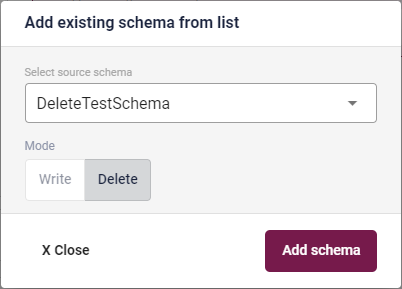
The result is a red-colored Schema with only a single mappable line - **ID**. You'll want to map this to your Product ID. Then, add a **Columns Filter** using the designated button.

Now, the Columns Filter can be used for a great number of thing, as detailed in the [Columns Filtering](https://content.raptorservices.com/help-center/tools/datamanager/static-relational-column-filters?hsLang=en) guide. In this case, however, we simply need to select **Add Static Filter**, select the column that shows In-Stock status, then set it to filter for out-of-stock as shown in this example:
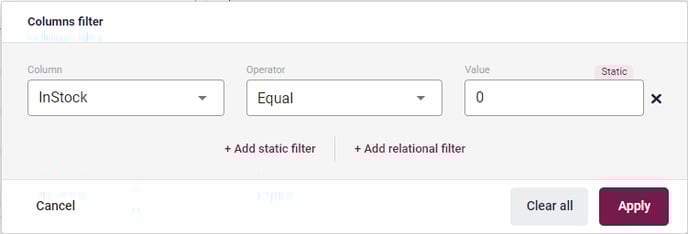
Of course, the exact lineup will depend somewhat on what your InStock data looks like. For example, a Boolean may have 'FALSE' rather than 0 as the indicator that something is out of stock. Make sure you know how your data is formated! Either way, **Apply** this filter, and you're basically done.

Finalize the Dataflow, you'll find that if you are using a Streaming API source, there's no need to schedule anything - it will run continuously. If you're using a non-streaming source, you'll probably want to set it to run hourly, though! Either way, anytime something goes out of stock, it'll be deleted from the Site Search, and if it comes back in stock, the run of the full Product Catalog Dataflow will restore it to the Search as well.
Of course, this is far from the only way to use the **Delete Schema** - but it should give you an idea of its capabilities!
- [Welcome to Raptor](https://content.raptorservices.com/help-center/welcome-to-raptor?hsLang=en#main-content)
- [Introduction](https://content.raptorservices.com/help-center/welcome-to-raptor?hsLang=en#introduction)
- [Analytics & Insights](https://content.raptorservices.com/help-center/analytics-insights?hsLang=en)
- [Data Management](https://content.raptorservices.com/help-center/data-management?hsLang=en#main-content)
- [Implementing Tracking](https://content.raptorservices.com/help-center/data-management?hsLang=en#implementing-tracking)
- [Implementing Raptor Recommendation](https://content.raptorservices.com/help-center/data-management?hsLang=en#implementing-raptor-recommendation)
- [Email Marketing Integration](https://content.raptorservices.com/help-center/data-management?hsLang=en#email-marketing-integration)
- [The Data Manager](https://content.raptorservices.com/help-center/data-management?hsLang=en#the-data-manager)
- [Streaming API](https://content.raptorservices.com/help-center/data-management?hsLang=en#streaming-api)
- [Destinations](https://content.raptorservices.com/help-center/data-management?hsLang=en#destinations)
- [Customer Data Platform](https://content.raptorservices.com/help-center/customer-data-platform?hsLang=en#main-content)
- [Introduction](https://content.raptorservices.com/help-center/customer-data-platform?hsLang=en#introduction)
- [Profile Unification](https://content.raptorservices.com/help-center/customer-data-platform?hsLang=en#profile-unification)
- [Audience Builder](https://content.raptorservices.com/help-center/customer-data-platform?hsLang=en#audience-builder)
- [Audience Insights](https://content.raptorservices.com/help-center/customer-data-platform?hsLang=en#audience-insights)
- [Calculated Attributes](https://content.raptorservices.com/help-center/customer-data-platform?hsLang=en#calculated-attributes)
- [Activations](https://content.raptorservices.com/help-center/customer-data-platform?hsLang=en#activations)
- [Single Customer View](https://content.raptorservices.com/help-center/customer-data-platform?hsLang=en#single-customer-view)
- [CDP Export API](https://content.raptorservices.com/help-center/customer-data-platform?hsLang=en#cdp-export-api)
- [Website Recommendations](https://content.raptorservices.com/help-center/website-recommendations?hsLang=en#main-content)
- [Introduction](https://content.raptorservices.com/help-center/website-recommendations?hsLang=en#introduction)
- [Recommendation Strategies](https://content.raptorservices.com/help-center/website-recommendations?hsLang=en#recommendation-strategies)
- [Feeds](https://content.raptorservices.com/help-center/website-recommendations?hsLang=en#feeds)
- [Tuning Parameters](https://content.raptorservices.com/help-center/website-recommendations?hsLang=en#tuning-parameters)
- [Working with the Raptor API](https://content.raptorservices.com/help-center/website-recommendations?hsLang=en#working-with-the-raptor-api)
- [Mail Recommendations](https://content.raptorservices.com/help-center/mail-recommendations?hsLang=en)
- [E-mail Triggers](https://content.raptorservices.com/help-center/e-mail-triggers?hsLang=en#main-content)
- [Get started](https://content.raptorservices.com/help-center/e-mail-triggers?hsLang=en#get-started)
- [E-mail Trigger Documentation](https://content.raptorservices.com/help-center/e-mail-triggers?hsLang=en#e-mail-trigger-documentation)
- [E-mail trigger integrations](https://content.raptorservices.com/help-center/e-mail-triggers?hsLang=en#e-mail-trigger-integrations)
- [Site Search](https://content.raptorservices.com/help-center/site-search?hsLang=en#main-content)
- [Search Tracking](https://content.raptorservices.com/help-center/site-search?hsLang=en#search-tracking)
- [Introduction](https://content.raptorservices.com/help-center/site-search?hsLang=en#introduction)
- [Implementing Site Search](https://content.raptorservices.com/help-center/site-search?hsLang=en#implementing-site-search)
- [Search Ranking & Recommendations](https://content.raptorservices.com/help-center/site-search?hsLang=en#search-ranking-recommendations)
- [Reporting](https://content.raptorservices.com/help-center/site-search?hsLang=en#reporting)
- [Merchandising](https://content.raptorservices.com/help-center/merchandising?hsLang=en#main-content)
- [Introduction to Merchandising](https://content.raptorservices.com/help-center/merchandising?hsLang=en#introduction-to-merchandising)
- [Boosted Campaigns](https://content.raptorservices.com/help-center/merchandising?hsLang=en#boosted-campaigns)
- [Customized Feeds](https://content.raptorservices.com/help-center/merchandising?hsLang=en#customized-feeds)
- [AI Models](https://content.raptorservices.com/help-center/ai-models?hsLang=en#main-content)
- [Customer Lifetime Value](https://content.raptorservices.com/help-center/ai-models?hsLang=en#customer-lifetime-value)
- [Administration](https://content.raptorservices.com/help-center/administration?hsLang=en#main-content)
- [Trust Center](https://content.raptorservices.com/help-center/administration?hsLang=en#trust-center)
- [User Management](https://content.raptorservices.com/help-center/administration?hsLang=en#user-management)
- [Operational Insights](https://content.raptorservices.com/help-center/administration?hsLang=en#operational-insights)
- [Data Retention](https://content.raptorservices.com/help-center/administration?hsLang=en#data-retention)
[](https://www.raptorservices.com/)
raptorsmartadvisor.com Help Center
Copyright © 2026, Raptor Services A/S