---
title: Introduction to the Customer Lifetime Value Model
description: The Customer Lifetime Value (CLV) Model will give you predictive KPIs that allow you to create audiences with attributes like high future value, high risk of churning, high historic value and a lot mo
---
[Skip to content](https://content.raptorservices.com/help-center/ai-models-introduction-to-the-customer-lifetime-value-model-how-to-set-up-a-clv-model#main-content)
![raptor-qntm-logo\_horizontal\_gradient.png\]](https://content.raptorservices.com/hs-fs/hubfs/raptor-qntm-logo_horizontal_gradient.png?height=40&name=raptor-qntm-logo_horizontal_gradient.png)
Open main navigation
Close main navigation
- [Go to raptorservices.com](https://raptorservices.com/)
[Go to raptorservices.com](https://raptorservices.com/)
Hello. How can we help you?
- There are no suggestions because the search field is empty.
1. [Help Center](https://content.raptorservices.com/help-center?hsLang=en)
2. [AI Models](https://content.raptorservices.com/help-center/ai-models?hsLang=en)
3. [Customer Lifetime Value](https://content.raptorservices.com/help-center/ai-models?hsLang=en#customer-lifetime-value)
# Introduction to the Customer Lifetime Value Model
### What is the Customer Lifetime Value Model?
The Customer Lifetime Value (CLV) Model is an AI model that predicts how valuable each customer is likely to be, and how likely they are to buy again. It adds a set of attributes to every customer profile, such as predicted future value, churn risk and historic value, which you can use to build audiences in the Audience Builder. Use it to focus your campaigns on the customers who matter most to your business, or to reach customers before they drift away.
### Prerequisites
- A Customer Data Platform (CDP). The CLV Model is found in the Raptor Control Panel under **AI Models** \> **Customer Lifetime Value**.
- A schema in the Data Manager that is populated with data, most often your buy data.
- At least 120 days of data on that schema.
- Numeric fields for the value (for example price or subtotal) and, if used, the quantity.
### Key concepts
**Absolute value attribute**: The raw number for a customer, such as an amount, a number of orders, a number of days or a probability. Use it to filter on a fixed threshold, for example customers with a historic value above 500 EUR.
**Percentile attribute**: Ranks each customer from 0 to 100 against the rest of your customer base on the same metric. A value of 90 means the customer is in the top 10%. Use it to target a relative share of your customers without knowing the exact cutoff.
**Model precision**: How accurately the model predicts actual customer behaviour, shown as **high** or **medium** on the model card.
🔍 **Note**: For percentiles, a higher value always means better customer behaviour. For metrics where a low raw number is better (days since last order, average days between orders, inactivity score and churn risk), the percentile is inverted.
**Buy events or aggregated orders?** You can use either. A few attributes may vary slightly if some customers place several orders on the same day, because orders from the same day are counted as one.
🔍 **Note**: The model works best on buy data, but you can run it on other schemas, such as visits or add-to-basket events. The attributes then have a different meaning. See Non-Monetary Calculations for Customer Lifetime Value Model.
### Customer Lifetime Value attributes
In the Audience Builder, select the **Have** condition and choose your CLV model as the source. The model is listed under its own name, for example "Website (buy)".
| Attribute | What it shows | Percentile attribute (higher = ) |
| --- | --- | --- |
| **Repurchase probability** | The probability that the customer places another order at some point in the future. Predicted by the model from the customer's number of orders, days since first and last order, personal buying rhythm, and how well your shop keeps customers coming back. | **Repurchase probability, percentile** (more likely to buy again) |
| **Churn risk** | The probability that the customer will not buy again: 100 minus repurchase probability. | **Churn risk, retention percentile** (lower churn risk) |
| **Historic value last 365 days** | The total value of the customer's orders in the last 365 days. | **Historical value last 365 days, percentile** (higher value) |
| **Historic value all time** | The total value of all the customer's orders. | **Historical value all time, percentile** (higher value) |
| **Predicted future value next 365 days** | The value the customer is expected to spend in the next 365 days: predicted number of orders multiplied by average order value. | **Predicted future value next 365 days, percentile** (higher value) |
| **Predicted Customer Lifetime Value** | Historic value all time plus predicted future value next 365 days. | **Predicted customer lifetime value, percentile** (higher value) |
| **Predicted number of orders next 365 days** | The number of orders the customer is expected to place in the next 365 days, based on their buying rhythm and repurchase probability. | **Predicted number of orders next 365 days, percentile** (more orders) |
| **Days since first order** | The number of days since the customer's first order. | **Days since first order, customer age percentile** (longer time since first order) |
| **Days since last order** | Also called recency. The number of days since the customer's last order. | **Days since last order, recency percentile** (more recent) |
| **Number of orders** | Also called frequency. The number of orders the customer has placed. | **Number of orders, order frequency percentile** (more orders) |
| **Average order value** | The customer's historic value all time divided by their number of orders. | **Average order value, order value percentile** (higher order value) |
| **Average days between orders** | The number of days between the first and last order, divided by the number of orders minus one. | **Average days between orders, purchase frequency percentile** (more frequent orders) |
| **Inactivity score** | Days since last order divided by the customer's average days between orders, as a percentage. Requires at least two orders. | **Inactivity score, activity recency percentile** (more recent activity) |
🔍 **Note**: Hover the i icon next to a percentile attribute in the Audience Builder to see what a higher value means.
💡 **Examples**:
1\) A customer with a repurchase probability of 75% has a churn risk of 25%.
2\) A customer with 3 orders, the first on day 0 and the last on day 100, has 50 average days between orders.
3\) A customer who usually orders every 10 days and last ordered 15 days ago has an inactivity score of 150. On the day of an order the score is 0, and it stays below 100 until the customer passes their usual buying interval.
For the full calculations, see [Technical Documentation: Repurchase Probability and Predicted Customer Lifetime Value](https://content.raptorservices.com/help-center/technical-documentation-repurchase-probability-and-predicted-customer-lifetime-value?hsLang=en).
### How to set up a CLV Model
1. In the Raptor Control Panel, go to **AI Models** \> **Customer Lifetime Value** and click **+ Create model**.
2. Under **General information**, enter a **Name** and a **Description**. The name is shown on the model card and as the source in the Audience Builder.
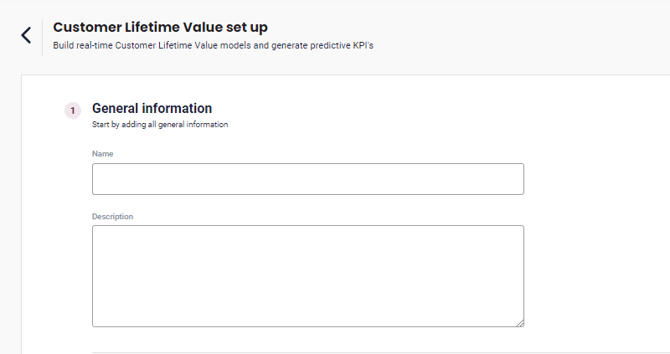
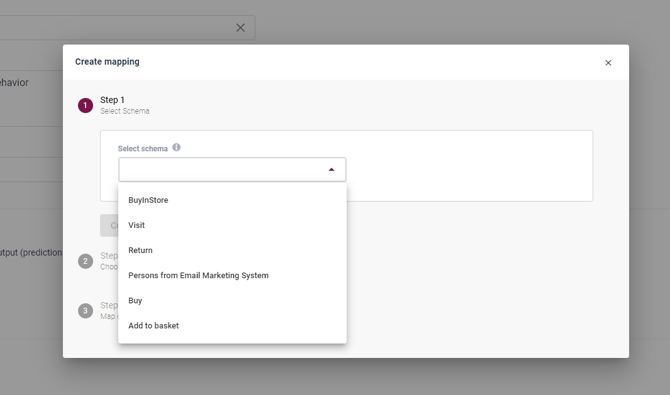
3. Under **Select schema & map data**, click **+ Create mapping**.
4. Select the schema the model should be based on, most often your buy schema, and click **Continue**.
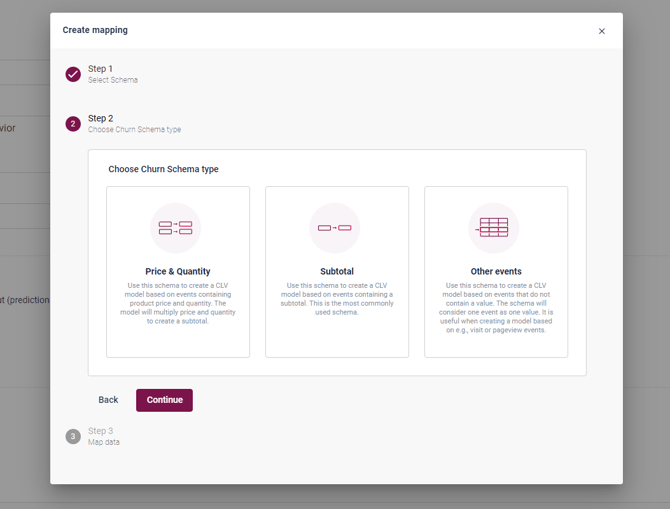
5. Select the CLV schema type that matches your data, and click **Continue**: a. **Price & Quantity**: your data has both a value (usually the product price) and a quantity (for example three identical t-shirts). b. **Subtotal**: your data has only a value, usually the subtotal of the order. c. **Other events**: one row of data equals one value, for example page views or visits.
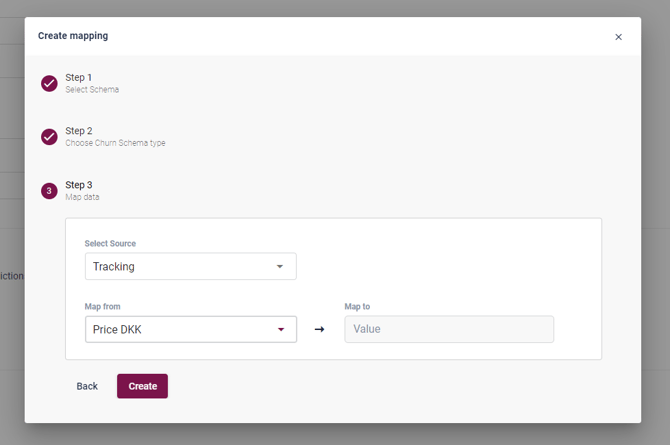
6. Select the source fields that match **Value** and, if relevant, **Quantity**, and click **Create**.
⚠️ **Warning**: Map numeric fields only. If a non-numeric field, such as a cookie ID or another identifier, is mapped to Value or Quantity, the model runs without producing results.
1. Optional: click **+ Create mapping** again to add data from another source to the same model.
2. Under **Schedule**, choose a time in **Select run time**. See Choosing a run schedule below.
3. Click **Save**. The model starts an initial training run, and you return to the overview page, where the model shows the status **Running**.
### Combining online and offline data
You can add several mappings to one model. If you have both a webshop and physical stores, combine buy data from both, so customers who mostly buy in-store are not seen as inactive.
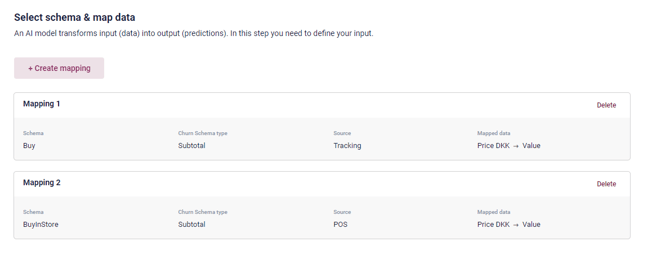
👀 **Use case**: To target each channel and the customers who buy in both, create three models: one on online buy data, one on offline buy data, and one combining both.
🔍 **Note**: When you combine two sources, they should cover roughly the same time period, and customers must be recognisable in the CDP across both sources.
Choosing a run schedule
The model runs once a day at the time you set. Each run includes the latest data in the CDP and recalculates the attributes for every customer profile.
👀 **Use case**: If your store (POS) data is loaded into the CDP every evening at 21:00, schedule the model after that, for example at 23:00, so it uses the freshest data.
👀 **Use case**: If you use CLV attributes to select e-mail recipients, schedule the model a couple of hours before the send-out. A customer who buys on the morning of the send-out is then no longer targeted as inactive.
### The overview page
The overview page shows a card for each CLV model with its status, name, description, run schedule, last finished run and model precision.

| Status / label | What it means |
| --- | --- |
| **Running** | The model is calculating new values. This usually takes a few minutes. |
| **Finished** | The model is active and its attributes are ready to use. |
| **No finished runs** | The model has not produced results yet. See the FAQ. |
| **Model precision is invalid** | The schema has less than 120 days of data, so the model cannot evaluate its precision yet. |
| **Invalid events** | A schema or another dependency the model uses has been deleted, and the model can no longer run. |
**Last finished run** shows when the model last finished calculating new values. It is usually a few minutes after the scheduled time.
**Model precision** Precision is **high** or **medium**, based on regular checks of the model's predictions against actual customer behaviour. The more data the model is trained on, the more precise it becomes. A model with medium precision can be used: precision improves as more data is added to the CDP.
The model is retrained and evaluated once a week, during the weekend. Hover the i icon next to the precision to see the last three evaluations, with date, status and reason.
### How to run a model manually
You can run a model outside its schedule with the buttons on the model card:
- **Train & Predict**: retrains the model and recalculates all values. Use it after a large data import, to get the most precise values. This can take a couple of hours.
- **Predict**: recalculates values with the latest data, using the settings from the last training. This takes a couple of minutes.
**⚠️ Warning:** Before you delete a model with **Delete**, update or delete any audiences built on its attributes. Otherwise those audiences will be inaccurate.
### FAQ
**Q: My model shows "No finished runs" after setup. What should I check?**
A: First, check that the fields mapped to Value and Quantity contain numeric values only, and edit the mapping if needed. Second, check that the schema has at least 120 days of data. If not, the model produces results once that threshold is met.
**Q: My model card shows "Model precision is invalid". What does that mean?**
A: The model does not yet have enough data to evaluate its own precision. This is expected when the schema has less than 120 days of data. No action is needed.
**Q: My model card shows "Invalid events". What does that mean?**
A: A schema or another dependency the model relies on has been deleted. Edit the model and point the mapping to a valid schema, or recreate the missing dependency and save the model again.
**Q: Should I use the absolute or the percentile version of an attribute?**
A: Use the absolute version for a fixed threshold, such as customers with more than 3 orders. Use the percentile version for a relative share, such as your top 10% customers by predicted value. Percentiles adjust automatically as your customer base changes.
- [Welcome to Raptor](https://content.raptorservices.com/help-center/welcome-to-raptor?hsLang=en#main-content)
- [Introduction](https://content.raptorservices.com/help-center/welcome-to-raptor?hsLang=en#introduction)
- [Analytics & Insights](https://content.raptorservices.com/help-center/analytics-insights?hsLang=en)
- [Data Management](https://content.raptorservices.com/help-center/data-management?hsLang=en#main-content)
- [Implementing Tracking](https://content.raptorservices.com/help-center/data-management?hsLang=en#implementing-tracking)
- [The Data Manager](https://content.raptorservices.com/help-center/data-management?hsLang=en#the-data-manager)
- [Implementing Raptor Recommendation](https://content.raptorservices.com/help-center/data-management?hsLang=en#implementing-raptor-recommendation)
- [Email Marketing Integration](https://content.raptorservices.com/help-center/data-management?hsLang=en#email-marketing-integration)
- [Streaming API](https://content.raptorservices.com/help-center/data-management?hsLang=en#streaming-api)
- [Destinations](https://content.raptorservices.com/help-center/data-management?hsLang=en#destinations)
- [Customer Data Platform](https://content.raptorservices.com/help-center/customer-data-platform?hsLang=en#main-content)
- [Introduction](https://content.raptorservices.com/help-center/customer-data-platform?hsLang=en#introduction)
- [Profile Unification](https://content.raptorservices.com/help-center/customer-data-platform?hsLang=en#profile-unification)
- [Audience Builder](https://content.raptorservices.com/help-center/customer-data-platform?hsLang=en#audience-builder)
- [Audience Insights](https://content.raptorservices.com/help-center/customer-data-platform?hsLang=en#audience-insights)
- [Calculated Attributes](https://content.raptorservices.com/help-center/customer-data-platform?hsLang=en#calculated-attributes)
- [Activations](https://content.raptorservices.com/help-center/customer-data-platform?hsLang=en#activations)
- [Single Customer View](https://content.raptorservices.com/help-center/customer-data-platform?hsLang=en#single-customer-view)
- [CDP Export API](https://content.raptorservices.com/help-center/customer-data-platform?hsLang=en#cdp-export-api)
- [Website Recommendations](https://content.raptorservices.com/help-center/website-recommendations?hsLang=en#main-content)
- [Introduction](https://content.raptorservices.com/help-center/website-recommendations?hsLang=en#introduction)
- [Recommendation Strategies](https://content.raptorservices.com/help-center/website-recommendations?hsLang=en#recommendation-strategies)
- [Feeds](https://content.raptorservices.com/help-center/website-recommendations?hsLang=en#feeds)
- [Tuning Parameters](https://content.raptorservices.com/help-center/website-recommendations?hsLang=en#tuning-parameters)
- [Working with the Raptor API](https://content.raptorservices.com/help-center/website-recommendations?hsLang=en#working-with-the-raptor-api)
- [Mail Recommendations](https://content.raptorservices.com/help-center/mail-recommendations?hsLang=en)
- [E-mail Triggers](https://content.raptorservices.com/help-center/e-mail-triggers?hsLang=en#main-content)
- [Get started](https://content.raptorservices.com/help-center/e-mail-triggers?hsLang=en#get-started)
- [E-mail Trigger Documentation](https://content.raptorservices.com/help-center/e-mail-triggers?hsLang=en#e-mail-trigger-documentation)
- [E-mail trigger integrations](https://content.raptorservices.com/help-center/e-mail-triggers?hsLang=en#e-mail-trigger-integrations)
- [Site Search](https://content.raptorservices.com/help-center/site-search?hsLang=en#main-content)
- [Search Tracking](https://content.raptorservices.com/help-center/site-search?hsLang=en#search-tracking)
- [Introduction](https://content.raptorservices.com/help-center/site-search?hsLang=en#introduction)
- [Implementing Site Search](https://content.raptorservices.com/help-center/site-search?hsLang=en#implementing-site-search)
- [Search Ranking & Recommendations](https://content.raptorservices.com/help-center/site-search?hsLang=en#search-ranking-recommendations)
- [Reporting](https://content.raptorservices.com/help-center/site-search?hsLang=en#reporting)
- [Merchandising](https://content.raptorservices.com/help-center/merchandising?hsLang=en#main-content)
- [Introduction to Merchandising](https://content.raptorservices.com/help-center/merchandising?hsLang=en#introduction-to-merchandising)
- [Boosted Campaigns](https://content.raptorservices.com/help-center/merchandising?hsLang=en#boosted-campaigns)
- [Customized Feeds](https://content.raptorservices.com/help-center/merchandising?hsLang=en#customized-feeds)
- [AI Models](https://content.raptorservices.com/help-center/ai-models?hsLang=en#main-content)
- [Customer Lifetime Value](https://content.raptorservices.com/help-center/ai-models?hsLang=en#customer-lifetime-value)
- [Administration](https://content.raptorservices.com/help-center/administration?hsLang=en#main-content)
- [Trust Center](https://content.raptorservices.com/help-center/administration?hsLang=en#trust-center)
- [User Management](https://content.raptorservices.com/help-center/administration?hsLang=en#user-management)
- [Operational Insights](https://content.raptorservices.com/help-center/administration?hsLang=en#operational-insights)
- [Data Retention](https://content.raptorservices.com/help-center/administration?hsLang=en#data-retention)
[](https://www.raptorservices.com/)
raptorsmartadvisor.com Help Center
Copyright © 2026, Raptor Services A/S