![raptor-qntm-logo_horizontal_gradient.png]](https://content.raptorservices.com/hs-fs/hubfs/raptor-qntm-logo_horizontal_gradient.png?height=40&name=raptor-qntm-logo_horizontal_gradient.png)
Where should your modules go?
There's no single right setup, but some placements consistently perform well. Use these examples as a starting point, then tune and split test from there.
👀 Read Recommendation strategies: the right products for every visitor for what each module does.
Classic e-commerce website
| Page | Module | Why it works |
|---|---|---|
| Front page | GetUserItemRecommendationsWeb | Returning visitors see personal picks straight away |
| Front page | GetPopularItemsWeb | New visitors without history still see relevant, trending products |
| Category page | GetPopularItemsInCategoryWeb | Helps visitors who don't know where to start in a large category |
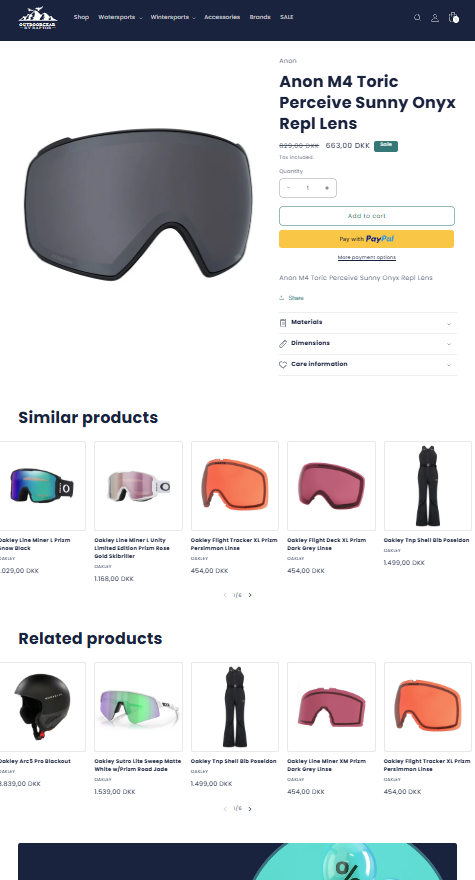
| Product page | GetSimilarItemsWeb | Offers alternatives if the product isn't quite right |
| Product page (below similar items) | GetPIMRelatedItemsWeb | Suggests products that go with the one being viewed |
| Product page | GetUserItemHistoryWeb | Brings visitors back to products they were considering |
| Powerstep (after add to basket) | GetPIMRelatedItemsWeb | The best moment for cross-selling: the visitor has just decided to buy |
| Basket | GetPIMRelatedItemsForBasketWeb | Increases basket size with products that complement the whole basket |
| Account page | GetUserItemRecommendationsWeb, GetUserItemHistoryWeb | Personal picks and recently viewed for logged-in customers |
| Empty search or 404 page | GetUserItemRecommendationsWeb, GetPopularItemsWeb | Keeps visitors on the site instead of a dead end |
🔍 Note: Avoid showing the same products in two modules on one page. For example, when GetSimilarItemsWeb and GetPIMRelatedItemsWeb are both on the product page, give Similar items weight a negative value in GetPIMRelatedItemsWeb. See How to setup GetPIMRelatedItems.
Content-driven website
If most of your traffic lands on articles, guides or recipes, connect content and products:
| Page | Module | Why it works |
|---|---|---|
| Article | GetItemsBasedOnContentWeb | Turns readers into shoppers with products featured in the article |
| Article | GetSimilarContentWeb | Keeps readers engaged with more content like this |
| Content front page | GetPopularContentWeb, GetUserContentRecommendationsWeb | Popular content for new visitors, personal picks for returning ones |
| Product page | GetContentBasedOnItemWeb | Inspiration and guidance next to the product |
🔍 Note: Content modules need ContentVisit tracking and content data. See Content data.
B2B website
B2B customers often log in and reorder the same products.
| Page | Module | Why it works |
|---|---|---|
| Front page or account page | GetUserItemHistoryWeb | Fast reordering of frequently bought products |
| Front page or account page | GetUserCrossSellingItemsWeb | Introduces products the customer hasn't bought yet |
| Product page | GetPIMRelatedItemsWeb | Accessories and consumables that belong with the product |
👀 Use case: Send a user ID for logged-in customers, so their history follows them across devices. See User Tracking: Understanding Soft IDs, Hard IDs & Raptor Identity Matching.
Next step
Once you know which modules go where, set up tracking. See Choose your tracking method.