![raptor-qntm-logo_horizontal_gradient.png]](https://content.raptorservices.com/hs-fs/hubfs/raptor-qntm-logo_horizontal_gradient.png?height=40&name=raptor-qntm-logo_horizontal_gradient.png)
Introduction
The Merchandising activation creates a connection between the Customer Data Platform and the recommendation engine. Through Merchandising campaigns you can target CDP audiences in your recommendation modules on your website. Here is how it works.
Setup
Establishing a Merchandising Activation is unsurprisingly simple. You only need to pick a name and, optionally, add a description of the Activation's purpose. There are no alternate Person Identifiers to choose from, as it will always be set up with cookieID (coid), nor any need to enter account-details. Thus, once you've picked a name, all you need to do is select the Audiences you wish to target with your Merchandising Campaigns, and hit the Save button.
Utilization
In order to make use of your new Activation - which will take a few minutes to update to the server and activate fully - you will need to head to the Merchandising-section and create a new Campaign. A number of detailed articles concerning Merchandising can be found in the appropriate section of the Help Center, but this step-by-step guide may be handy for a start.
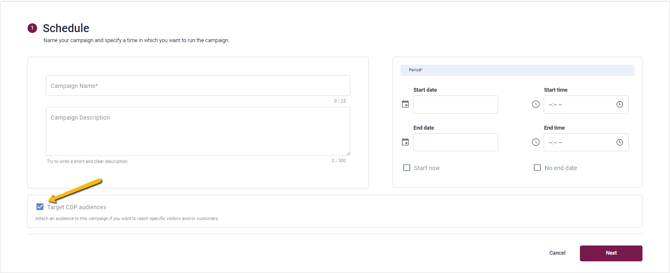
In brief, however, the key is to check the Target CDP Audiences checkbox on the first page of the campaign creation process. Doing so will, if you have already set up a Merchandising Activation as described earlier, allow you to link the Audiences you selected at that stage - be it a specific one or all of them - to the Campaign on the next page.
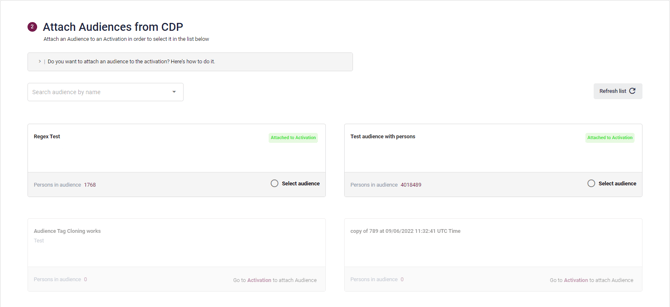
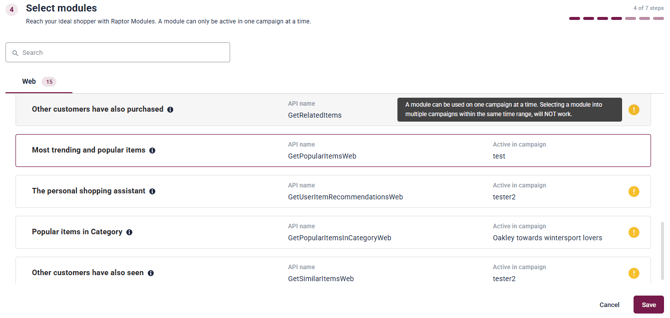
Afterwards, you will select - manually or otherwise - the relevant products, as normal. Once the Campaign is finalized and established, any visitor matching any of the selected audiences will be shown the Campaign products, overriding the normal recommendations, whereas those not matching the selected audience continue to receive the regular suggestions provided by Raptor's proprietary Recommendation Engine.
As such, the Merchandising Activation allows you to set up a highly targeted 'short circuit' of the Recommendation Engine's normal functions, in order to tout a specifically selected product-set to a specifically selected audience.
Using CDP audiences across sister accounts
In some setups, the account running Merchandising campaigns is not the same account where Customer Data Platform (CDP) audiences are defined. This is common in multi‑account environments, for example when operating several regional or brand accounts that share a central CDP setup.
To support these scenarios, Merchandising can use CDP audiences from a designated CDP account within a group of sister accounts.
How audience resolution works
- Accounts can be grouped as sister accounts.
- Within a group, one account can be designated as the CDP account.
- Merchandising campaigns will automatically look up audiences from the designated CDP account when targeting CDP audiences.
- If no CDP account is explicitly designated, each account will, by default, use its own CDP audiences.
This ensures that audience targeting works seamlessly even when recommendations and CDP data are managed in separate accounts.
🔍 Note: At the moment, this configuration is handled on the backend. UI support for managing the CDP account designation will be added in a future update.