![raptor-qntm-logo_horizontal_gradient.png]](https://content.raptorservices.com/hs-fs/hubfs/raptor-qntm-logo_horizontal_gradient.png?height=40&name=raptor-qntm-logo_horizontal_gradient.png)
Identifying unique persons across all of your channels, platforms, and systems is the very foundation of a Customer Data Platform (CDP). This article will introduce you to how profile unification works at Raptor when data is ingested into the CDP and when you manage and activate your audiences.
Profile Unification
When engaging with Raptor, you will come across the acronym RUP. RUP is short for Raptor Unified Profile and is the engine that matches person identifiers across channels and consolidates them into the same unique profile as data streams into the CDP from your various sources. Now, based on these profiles, you can form audiences in the Audience Builder, look up profile metrics in the Single Customer View, create CLV models, activate audiences, etc.
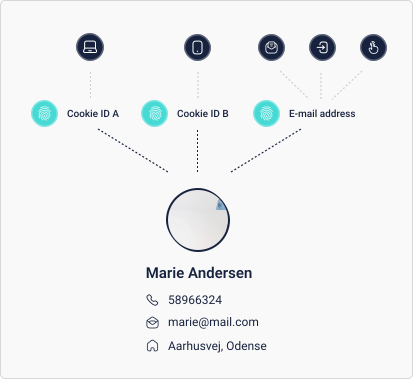
Profile Unification succeeds out of a deterministic approach, which means that person identifiers must be identical across systems to be consolidated into the same profile. Here is an example:
- Person X visits your website from a laptop. This will create a cookie ID A that is picked up by Raptor's tracking script and forms an anonymous profile in your CDP.

- Person X revisits your site some days later, but this time from a smartphone. This visit creates a new anonymous profile since the cookie ID created by the smartphone is different from the one set by the laptop browser. We'll call it cookie ID B.

- This time, user X purchases from your site and leaves an e-mail address at check-out. Now, the e-mail address and Cookie ID B are stitched together into the same profile, and the user is no longer anonymous since an e-mail address is a unique identifier.

- After a couple of months and several visits on your website, person X also makes a purchase from the laptop by logging in using the e-mail address from before. The full visit history on the no longer anonymous person is now attached to the profile in the CDP by adding interactions with cookie ID A picked up by the tracking script.

- Person X has along the way also created a profile on your site and signed up for your newsletter. By ingesting mail openings, mail clicks and profile details like an address into the CDP, the profile will be enriched with information that is very useful when building audiences and finding patterns across your customers and their behavior.
Unique identifiers
When planning which identifiers should go into the profile unification, it is important to think about uniqueness versus non-uniqueness. Normally, you will have a master ID/customer ID from e.g. your CRM system that will uniquely identify a profile (either a person or an account). In other cases, you can use an email address as a unique identifier. In that case, you should be aware that if your customers change email addresses, a new profile will be created without the opportunity to connect the new profile to the data of the old profile.
Setting a person identifier as non-unique means that a profile can contain multiple instances of that identifier. This will be the case with cookie IDs. A non-unique ID cannot, however, exist on two different profiles at the same time. For example:
- If a cookie ID has been seen by the profile unification system along with profile A, but is later seen along with profile B, the cookie ID (and the interactions associated with that cookie ID) will shift from profile A to profile B.
This logic ensures the most updated affiliation between a profile in the CDP and the actions performed by the person most recently associated to the profile.
Anonymous profiles
As described above, anonymous profiles (consisting only of a cookie ID) play a role in the CDP. First of all, anonymous profiles create a substantial part of the traffic on your website, and should be considered as potential customers who can be targeted with introductory offers and product or content recommendations. They are an active part of your user base.
🔍 Note: To keep profiles stored in the CDP relevant, anonymous profiles that haven’t shown any activity for 12 months are automatically deleted from the system.
Deleting or overwriting profiles
You need to be aware of different approaches when managing profiles in the CDP. Basically, there are two approaches:
- Total deletion of the profile and all data associated with it (all interactions, identifiers and persondata) -> Use the right-to-be-forgotten feature (use either the UI or the API)
- Updating your profiles by overwriting permissions and other persondata (this will NOT delete any profiles) -> Use the Overwrite-feature in the Data Manager.
Validation
Validation of your person identifiers is extremely important to avoid wrong data contaminating your CDP. Once contaminated person identifiers have been ingested, they are very hard to clean up, sometimes leaving no choice but to create a new account.
When creating person identifiers, you have a range of validation options. Use them to make sure that only correct data streams into the CDP.
Identifiers can be of different types: GUID, Email address, Phone number or Generic. GUID and Email address are validated automatically by the system. When using the Generic type, you will need to build a strong set of validation rules yourself.
For Generic identifiers, you can choose between two ways of validating:
- Regex validation: a regular expression the value must match, e.g.
^\d{6,10}$for an ID of 6-10 digits. If a regex is set, it is used instead of the rules below - Rules:
- Minimum and maximum number of characters
- Allow letters
- Allow numbers
- Allow spaces
- Allowed special characters, e.g.
+or.
All identifiers also have a Case sensitive setting. If it is set to No, ABC123 and abc123 are treated as the same identifier.
For example:
- The customer ID from your CRM system always consists of 10-12 characters, both numbers and letters, never spaces and no special characters. Apply these rules:
- Minimum number of characters: 10
- Maximum number of characters: 12
- Allow letters
- Allow numbers
- Do not allow spaces
- Do not allow special characters
Apply as many rules as possible. The purpose of the validation is to filter away wrong or flawed data before it enters the CDP. If data violating the validation rules starts streaming through the Data Manager, the dataflow will fail, giving you a chance to correct the errors that caused it.
💡 Tip: Be careful with spaces and special characters. If an identifier allows them, +45 51 15 51 15 and +4551155115 are both valid, but they are two different identifiers and the profiles will not be unified. Likewise, a regex of .+ accepts any value, so the data is not really validated.
See the validation rules in the Data Manager
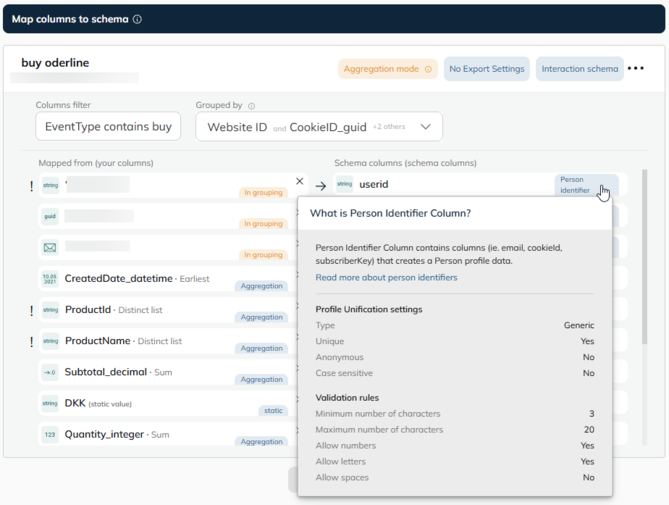
You can see the validation rules while you set up a dataflow. In Data Manager > Transform & Map, schema columns used as person identifiers are marked with a Person identifier label. Hover over the label to see:
- Profile Unification settings: Type, Unique, Anonymous and Case sensitive
- Validation rules: the regex or rules set up for the identifier (Generic identifiers only)
This can help you prepare and transform your source data into the right format before it is ingested, e.g. by using custom columns to align the format.
Reach out to Raptor Support if you have questions or doubts about validation or person identifiers in genera : support@raptorservices.com
🔍 Note: We follow the Unicode standard when determining characters, meaning letters include all alphabetic characters across languages (e.g., A, å, Ω, Ж) and numbers include all numeric characters defined by Unicode (e.g., 0-9, ٩, Ⅻ).