![raptor-qntm-logo_horizontal_gradient.png]](https://content.raptorservices.com/hs-fs/hubfs/raptor-qntm-logo_horizontal_gradient.png?height=40&name=raptor-qntm-logo_horizontal_gradient.png)
Introduction
Relation Data is a new schema type in the Customer Data Platform (CDP) designed to support one‑to‑many relationships. It allows you to link a single profile to multiple related objects—such as subscriptions, courses, insurance policies, contracts, memberships, or other relevant entities and properties—without duplicating attributes across data sources.
This creates a scalable, flexible way to enrich profiles and build highly targeted audiences.
With Relation Data, the Audience Builder now supports filtering within relational objects, enabling segmentation logic that goes beyond flat profile attributes.
Key Capabilities
One‑to‑Many Data Modeling
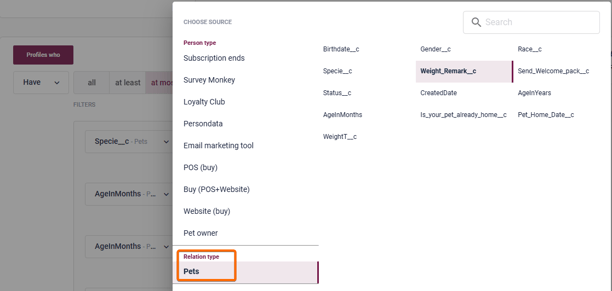
You can now model structures where one person can be linked to many objects, each with its own set of attributes. Examples include:
- One profile → many children
- One profile → many vehicles
- One profile → many subscriptions
The Relation Data schema provides an extensible structure to hold these objects and their attributes.
How It Works
Schema Structure
In Data Management, go to Schemas, and click 'Create new schema':
- Schema name: Relation Data
- Primary key:
RelationId - Each relational object is linked to a profile via an identifier (e.g.,
contactId,customerId)
Each relational record represents one object, meaning profiless with many related objects will have multiple Relation Data entries.
🔍Note: Each relational object requires its own unique RelationId. A single RelationId shared across multiple objects of the same type will not model the relationship correctly.
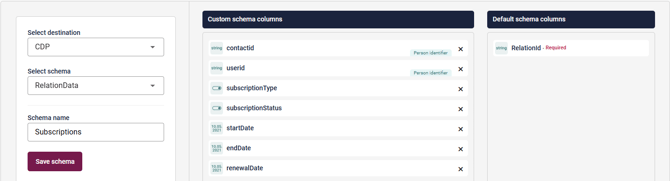
👀 Use case: If a profile is linked to multiple objects of the same type — for example, three vehicles or two subscriptions — each object must be ingested as a separate record, all sharing the same profile identifier (e.g. contactId or customerId).
Audience Builder Enhancements
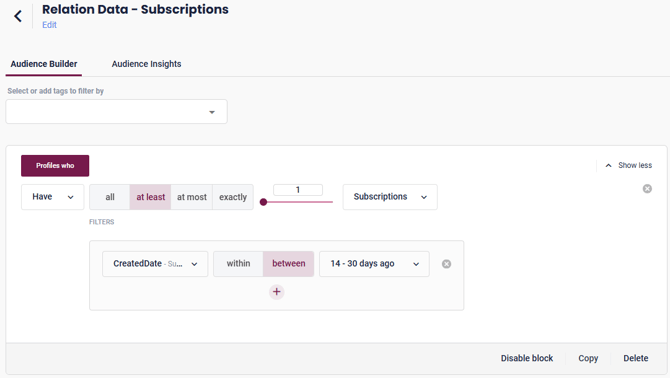
The Audience Builder introduces expanded operators for working with relational objects, including:
- All
- At least / At most / Exactly
These give you fine‑grained control over how many relational objects must match the conditions.
👀 Use case:
Use All when you want to ensure that every relational object linked to the profile matches all the attribute filters you have defined.
This operator is ideal when you want strict consistency across all related items.
For example:
- “Profiles where all linked subscriptions are active.”
- “Profiles where all owned vehicles have an emission class of Euro 6.”
If no filters are selected, the condition cannot be evaluated and should not be used.
Attribute‑Level Filtering Inside Relations
The Audience Builder supports deep filtering within the relational objects themselves.
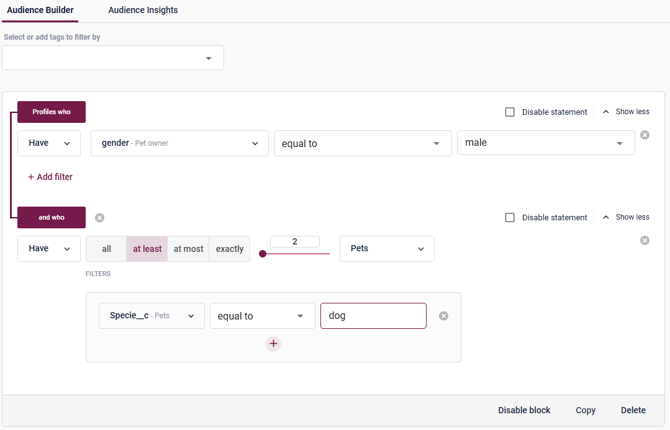
This means you can build audiences based on attributes not only on the profile level, but also within the related object.
- Profiles who own at least 2 cars
- Profiles who have exactly 1 child, where the child's age (in weeks) is between 24 and 36 and birth_remark equals born prematurely
These examples show how Relation Data allows for nested conditions—first selecting the profile, then applying logic inside the related items.
With Relation Data, you can now express segmentation logic that previously required heavy preprocessing.
For example:
- “Profiles with gender = male AND who own at least one animal younger than 12 months where weight remark = overweight.”
- “Profiles who have a related object matching multiple attribute conditions simultaneously.”
This makes it easier to activate campaigns that require relationship‑aware logic.
Typical Use Cases
Here are generalized examples inspired by internal work files
-
Profiles who own 2 or more dogs, where at least one dog is younger than 12 months
-
Parents who have at least one child under 5 years old and another child aged 6–12
-
Profiles who own more than 1 vehicle, where at least one vehicle has a service due within 30 days
-
Profiles who have at least 2 active subscriptions, where at least one is about to renew within 14 days
-
Persons who have 1 or more medications, and at least one requires renewal within 7 days
-
Accounts where at least 3 contacts have interacted with your website in the last 60 days
These examples demonstrate how Relation Data enables segmentation involving secondary entities, not just the profile.
Understanding filter scope: within-object vs. across-object
When building audiences with Relation Data, there is an important distinction in where your filters are evaluated. Two configurations that look almost identical can produce meaningfully different results depending on whether the conditions are placed inside a single block or split across two separate blocks.
The scenario
Consider a customer with two linked address records:
| Address record 1 | Address record 2 | |
|---|---|---|
| SupplyProduct | present | present |
| ServiceProduct | present | empty |
The goal: find all customers who have a supply product but do not have a service product.
Configuration A — filters combined within a single block
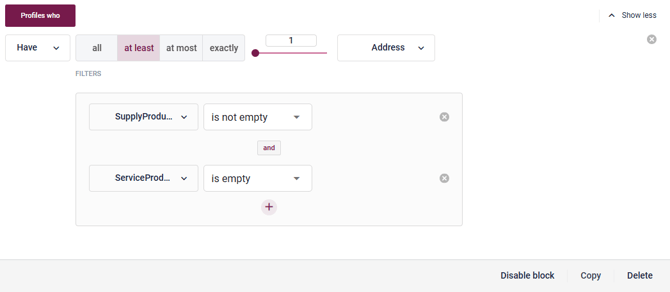
Both conditions are placed inside the same block, joined by AND:
Profiles who have at least 1 Address where SupplyProduct is not empty AND ServiceProduct is empty
The two filters are evaluated together against the same address record. For a record to qualify, it must satisfy both conditions simultaneously.
In the example above, Record 2 has a supply product and an empty service entry — so it satisfies both filters on its own, and the profile is included. However, if the supply product and the missing service entry existed on different address records, neither record would match both conditions at once, and the profile would be excluded.
👀 Use case: Use this configuration when you want to target a specific relationship — for example, an address that has a supply contract but is missing a linked service agreement.
Configuration B — conditions split across two blocks
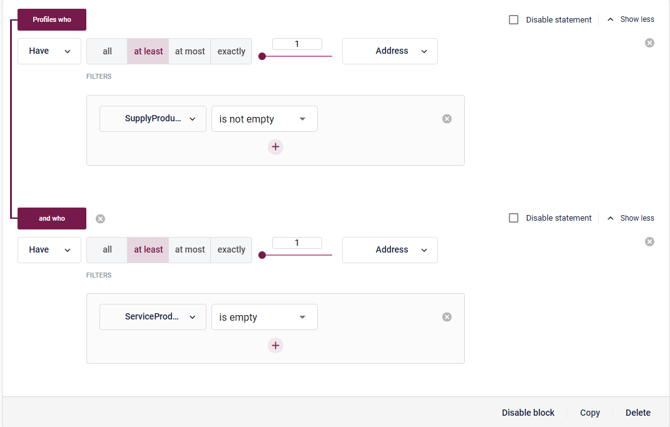
The two conditions are placed in separate blocks, connected by and who:
Block 1: Profiles who have at least 1 Address where SupplyProduct is not empty and who Block 2: have at least 1 Address where ServiceProduct is empty
Each block is evaluated independently. The profile qualifies as long as at least one address satisfies Block 1 and at least one address — not necessarily the same one — satisfies Block 2.
This means a customer who has a supply product on one address and a missing service entry on a completely different address will still be included.
👀 Use case: Use this configuration when you want to cast a broader net across all of a customer's linked records, regardless of whether the conditions exist on the same object.