![raptor-qntm-logo_horizontal_gradient.png]](https://content.raptorservices.com/hs-fs/hubfs/raptor-qntm-logo_horizontal_gradient.png?height=40&name=raptor-qntm-logo_horizontal_gradient.png)
Accurate product data is essential for Raptor's Recommendation Engine. The quality of its output depends directly on how well products are described — when attributes like categories, pricing, availability, and descriptions are correct and consistent, the system can better understand relationships between products and match them to user behavior.
The ID you choose determines how Raptor combines:
- real‑time tracking
- product catalog attributes
- historical order data
- search behavior
- trigger conditions
- e-mail recommendations
This article explains:
- MasterId vs ProductId vs SKU
- Which ID to send in tracking
- How Raptor uses product catalog vs tracking data
- Common pitfalls and how to avoid them
This is a conceptual guide — implementation details are covered in the tracking articles.
Why ProductId Matters
In Raptor, ProductId is the primary key for joining:
- your product catalog
- your tracking events (Visit, Basket, Buy, Favorite, Search…)
- order history
- content-based models
- collaborative filtering models (behavior-based patterns)
🔍ProductId must be consistent across all touchpoints.
This includes:
- tracking (Visit, Basket, Buy, Favorite, Search…)
- product catalog
- basket tracking
- favorite list
- historical orders
- POS imports (if any)
👀 If ProductId does not match between your systems, your recommendations and triggers will be inaccurate.
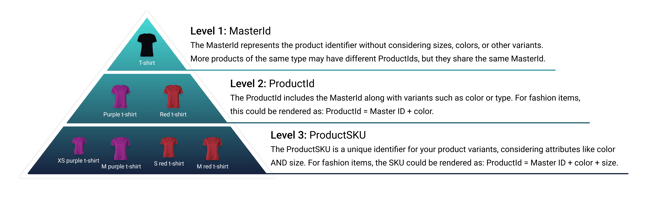
Product ID Hierarchy
A typical ecommerce catalog uses three ID levels.
Here is how they map to Raptor:
Level 1 — MasterId
The ID that represents the parent product without variant attributes.
Example:m57500 = “Spring Running Jacket” (all colors & sizes)
Used for:
- grouping variants
- excluding variant duplicates (“don’t recommend the red version while viewing the blue version”)
- category-level insights
MasterId is optional, but recommended for fashion & variant-heavy catalogs.
Level 2 — ProductId (Primary Key)
This is the ID you MUST use in tracking.
Represents a specific variant of a product.
Example:m57500_Red = “Running Jacket · Red”
Rules:
- Must uniquely identify what users see, click, add, or buy
- Must match your product catalog exactly
- Must remain stable across pages and events
- Should reflect the product page’s URL
- Should not include size (see below)
Raptor outputs ProductId in all recommendation modules:
- Website Recommendations
- E-mail Recommendations
- Personalized triggers
Level 3 — ProductSKU (Not tracked)
Represents a product variant with size included.
Example:m57500_Red_Large = “Spring Running Jacket · Red · Large”
SKU‑level data is not useful for recommendations and should not be part of:
- ProductId
- MasterId
- BasketContent
- FavoriteListContent
- Product catalog primary key
You should only send SKU if you create custom parameters, e.g., for Size‑specific triggers.
⚠️ Never use SKU as ProductId or MasterId in standard Raptor tracking.
Illustration of product hierarchy:
The Three-Level Structure Beyond E-commerce
The three-level hierarchy above uses a fashion e-commerce catalog as its reference point — but the same logic applies to other content types and industries. What changes is the terminology, not the structure. The table below maps the e-commerce levels to two common non-retail contexts:
| Level | E-commerce | News / Media | Ferry Ticketing |
| 1 — Parent / Group | MasterId | ContentId | RouteId |
| 2 — Primary Key (tracked) |
ProductId |
VersionId | DepartureId |
| 3 — Variant / Instance (not tracked) | ProductSKU | DistributionFormatId | TicketVariant / TicketInstance |
News / Media — Article Structure
Level 1 — ContentId
Represents the parent article, used for grouping all versions, aggregated performance insights, and cross-language or cross-format recommendations.art_9821 = "AI is Transforming the Retail Market"
Level 2 — VersionId (Primary Key)
Represents a specific version of the article. This is the ID used in tracking and recommendation engines — equivalent to ProductId in e-commerce.art_9821_EN or art_9821_DA_Premium / art_9821_DA_Free
Level 3 — DistributionFormatId
Represents a specific distribution or playback format. Typically not used as the recommendation ID.art_9821_DA_Web / art_9821_DA_iOS / art_9821_DA_PDF / art_9821_DA_Audio Can also include streaming or quality variants:art_9821_EN_Video_1080p / art_9821_EN_Video_4K
Ferry Ticketing
Level 1 — RouteId
Represents the overall ferry route, used for grouping all departures, route-level analytics, and recommendation logic (e.g. "popular ferry routes"). Equivalent to MasterId.route_cph_osl = "Copenhagen → Oslo Ferry Route"
Level 2 — DepartureId (Primary Key)
Represents a specific departure instance — the ID used in tracking, recommendations, and booking flow analytics. Equivalent to ProductId.route_cph_osl_20260714_1600 or including operator: dfds_cph_osl_20260714_1600
Level 3 — TicketVariant / Ticket
Instance Represents ticket type, cabin type, vehicle inclusion, or seat. Equivalent to ProductSKU — not used as the recommendation ID. Ticket type: dfds_cph_osl_20260714_1600_STANDARD / _PREMIUM / _CABIN Cabin/vehicle variant: dfds_cph_osl_20260714_1600_CABIN_SEAVIEW / _CAR_INCLUDED Unique ticket instance: ticket_84930211
Choosing the Correct ProductId for Tracking
✔ If your shop uses a single product ID per item:
Use that ID as ProductId in tracking.
✔ If your shop has variants (color, type, edition):
Include the variant attributes in ProductId, e.g.:
MasterId + “_ColorName”12345_Black, 12345_Red
✔ Do not include size in ProductId
How Raptor Uses Product Data (Tracking vs Catalog)
Different Raptor modules use different sources of product data.
Website Recommendations:
| Data Type | Source |
|---|---|
| Real‑time user behavior | Tracking (visit, basket, buy, favorite) |
| Attributes (title, brand, price, category) | Catalog |
| Product images | Catalog |
| Variant exclusion (same MasterId) | Tracking + Catalog |
| Availability / stock | Catalog |
👀 Use case: Web Recommendations = Tracking for behavior + Catalog for product attributes
E-mail Recommendations
| Data Type | Source |
|---|---|
| Product selection | Catalog + Recommendation Engine logic |
| Personalization logic | Tracking (who they are, what they did) |
| Product images, categories, titles, brand | Catalog |
👀 Use case: Email modules use product catalog data for the items, and tracking to personalize.
Behavioral Triggers (Email Triggers)
| Data Type | Source |
|---|---|
| Trigger conditions (abandoned basket, price drop, stock change) | Tracking + Catalog |
| Product data in email | Catalog |
👀 Use case: Triggers fire because of tracking, but populate emails using Product Catalog items.
Site Search
| Data Type | Source |
|---|---|
| Query → product relationships | Tracking |
| Search index, attributes, filters | Catalog |
👀 Use case: Tracking powers search intelligence; catalog powers search results.
Why MasterId Matters (Variant Exclusion)
When ProductId and MasterId are included in tracking, recommendation modules can:
- avoid recommending identical products in different colors
- show variety rather than duplicates
- improve recommendation diversity
- rank meaningful alternatives
Example:
A user is viewing “Running Jacket · Green (ProductId m57500_Green)”
If “m57500” is sent as MasterId:
✔ Raptor can exclude other colors of the same jacket
✔ Recommendations become “similar products” instead of duplicates
⚠️ Warnings
Do not mix ID levels in tracking
If ProductId is on a variant level, send ProductId in the following parameters — not MasterId or SKU:
- BasketContent
- FavoriteListContent
- Buy events
- Site Search tracking
Tracking ProductId must always match catalog ProductId
If not, recommendations will:
- fail to connect tracking to product metadata
- show wrong, missing, or blank products
- break category history
- reduce personalization quality
Keep ID format consistent across:
- website tracking
- historical order imports
- POS imports
- Catalog updates
- category Catalogs
- email product catalogs
Want SKU-specific triggers (e.g., size “Back in stock”)?
You must add custom parameters (e.g., "size" as a custom parameter in the tracking template) — do not reuse ProductId.
Summary
- ProductId is the key that ties all Raptor product data together.
- MasterId improves recommendation diversity.
- SKU should not be used in tracking or as ProductId.
- ProductId must be identical in tracking and product catalog.
- Different Raptor modules use tracking vs catalog data differently, but all depend on correct IDs.
- Always choose one clean, consistent ProductId strategy.