---
title: Introduction to Merchandising
description: With our merchandising center you can manage and control which product recommendations to show in the Raptor modules in all channels - without compromising on relevance of the recommendation. The pu
---
[Skip to content](https://content.raptorservices.com/help-center/introduction-to-merchandising#main-content)
![raptor-qntm-logo\_horizontal\_gradient.png\]](https://content.raptorservices.com/hs-fs/hubfs/raptor-qntm-logo_horizontal_gradient.png?height=40&name=raptor-qntm-logo_horizontal_gradient.png)
Open main navigation
Close main navigation
- [Go to raptorservices.com](https://raptorservices.com/)
[Go to raptorservices.com](https://raptorservices.com/)
Hello. How can we help you?
- There are no suggestions because the search field is empty.
1. [Help Center](https://content.raptorservices.com/help-center?hsLang=en)
2. [Merchandising](https://content.raptorservices.com/help-center/merchandising?hsLang=en)
3. [Introduction to Merchandising](https://content.raptorservices.com/help-center/merchandising?hsLang=en#introduction-to-merchandising)
# Introduction to Merchandising
### What is Merchandising?
With our merchandising center you can manage and control which product recommendations to show in the Raptor modules in all channels - without compromising on relevance of the recommendation.
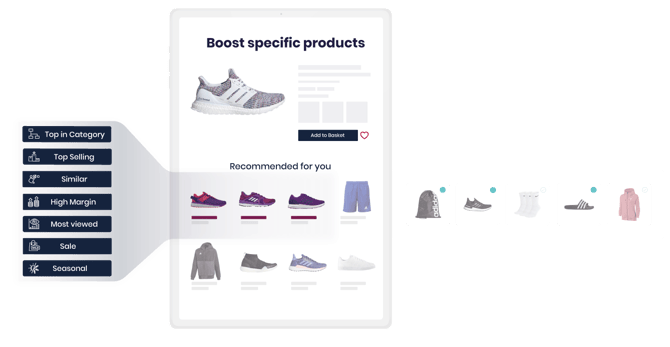
Merchandising lets you control which products appear in Raptor's recommendation modules, without losing the relevance personalization gives you. Instead of leaving every recommendation entirely up to Raptor's algorithm, you can boost specific products so they stand out in Web, Email, and Site Search recommendation modules. It's aimed at e-commerce managers and merchandisers who want to run sales pushes, clear stock, or promote sponsored products without touching any code.
#### **Prerequisites**
- A product catalog connected to Merchandising (see [*Setting up a Product Catalog for Merchandising*](https://content.raptorservices.com/help-center/setting-up-a-product-catalog-for-merchandising?hsLang=en)). At minimum, this catalog needs Product ID and Image URL fields.
- At least one existing Web, Email, or Site Search recommendation module to feature boosted products in.
### Key concepts
**Recommendation module**: The Web, Email, or Site Search element that shows a set of recommended products to a customer.
**Product candidate set**: For a given module and customer, Raptor's algorithm shortlists a pool of roughly 50 to 100 relevant products. Only products in this pool can be boosted, since Merchandising works within what the algorithm already considers relevant.
**Boosted Campaign**: A scheduled campaign that raises or suppresses specific products' priority within one or more recommendation modules, for a set period and optionally a specific CDP Audience.
**Boosting level**: How strongly a product is pushed within its module, from suppressed (pushed to the bottom) to high (pushed near the top).
### How Merchandising fits into your workflow
Setting up Merchandising involves four stages:
1. Connect a product catalog dedicated to Merchandising. See [*Setting up a Product Catalog for Merchandising*](https://content.raptorservices.com/help-center/setting-up-a-product-catalog-for-merchandising?hsLang=en).
2. Decide which recommendation modules you want to feature boosted products in. A module can only host one active campaign at a time.
3. Create a Boosted Campaign to choose your products, set a boosting level, and schedule when it runs. See [*How to set up a Boosted Campaign*.](https://content.raptorservices.com/help-center/how-to-set-up-a-boosted-campaign-1?hsLang=en)
4. Track results in Merchandising Reporting, including clicks and revenue generated by the campaign. See [*Introduction to Merchandising Reporting*.](https://content.raptorservices.com/help-center/introduction-to-merchandising-reporting?hsLang=en)
🔍 **Note:** You can also serve merchandised products directly through a Customized Feed instead of a Boosted Campaign. See *I[ntroduction to Customized Feeds](https://content.raptorservices.com/help-center/introduction-to-customized-feeds?hsLang=en)*.
### Common Merchandising strategies
- **Supplier-sponsored campaigns**: Boost products from a specific supplier, either within an existing module or in a dedicated module built for that supplier.
- **High profit margin products**: Boost products with strong margins. Mark these in your product feed, either with the actual margin value or a classification such as A, B, or C.
- **Surplus stock clearance**: Boost excess inventory to move it before it loses value.
- **Seasonal and promotional items**: Boost on-sale products, seasonal items, or your top categories and brands.
#### **Merchandising in practice**
B2B supplier Carl Ras uses Merchandising to turn its "most popular items right now" recommendation module into supplier ad space, giving specific brands more exposure as part of their supplier agreements, while also prioritizing high-margin products.
👀 **Use case**: *"It's a powerful tool that allows us to measure impact and have dialogues with suppliers based on their campaigns' performance*," says Søren Elgum, Head of Digital Marketing & Sales at Carl Ras. "*We can even prioritize high-margin products and decide how much we need to boost the products in each module*."
Read the [full Carl Ras case study](https://www.raptorservices.com/cases/how-the-b2b-carl-ras-succeeded-with-personalization-online/) for more on how they use Merchandising.
🔍 **Note**: Only products already in a module's product candidate set can be boosted. Boosting a product the algorithm wouldn't otherwise consider relevant for that module does not bring it into the recommendations. Read more about [*Merchandise boosting*](https://content.raptorservices.com/help-center/merchandise-boosting?hsLang=en).
- [Welcome to Raptor](https://content.raptorservices.com/help-center/welcome-to-raptor?hsLang=en#main-content)
- [Introduction](https://content.raptorservices.com/help-center/welcome-to-raptor?hsLang=en#introduction)
- [Analytics & Insights](https://content.raptorservices.com/help-center/analytics-insights?hsLang=en)
- [Data Management](https://content.raptorservices.com/help-center/data-management?hsLang=en#main-content)
- [Implementing Tracking](https://content.raptorservices.com/help-center/data-management?hsLang=en#implementing-tracking)
- [Implementing Raptor Recommendation](https://content.raptorservices.com/help-center/data-management?hsLang=en#implementing-raptor-recommendation)
- [Email Marketing Integration](https://content.raptorservices.com/help-center/data-management?hsLang=en#email-marketing-integration)
- [The Data Manager](https://content.raptorservices.com/help-center/data-management?hsLang=en#the-data-manager)
- [Streaming API](https://content.raptorservices.com/help-center/data-management?hsLang=en#streaming-api)
- [Destinations](https://content.raptorservices.com/help-center/data-management?hsLang=en#destinations)
- [Customer Data Platform](https://content.raptorservices.com/help-center/customer-data-platform?hsLang=en#main-content)
- [Introduction](https://content.raptorservices.com/help-center/customer-data-platform?hsLang=en#introduction)
- [Profile Unification](https://content.raptorservices.com/help-center/customer-data-platform?hsLang=en#profile-unification)
- [Audience Builder](https://content.raptorservices.com/help-center/customer-data-platform?hsLang=en#audience-builder)
- [Audience Insights](https://content.raptorservices.com/help-center/customer-data-platform?hsLang=en#audience-insights)
- [Calculated Attributes](https://content.raptorservices.com/help-center/customer-data-platform?hsLang=en#calculated-attributes)
- [Activations](https://content.raptorservices.com/help-center/customer-data-platform?hsLang=en#activations)
- [Single Customer View](https://content.raptorservices.com/help-center/customer-data-platform?hsLang=en#single-customer-view)
- [CDP Export API](https://content.raptorservices.com/help-center/customer-data-platform?hsLang=en#cdp-export-api)
- [Website Recommendations](https://content.raptorservices.com/help-center/website-recommendations?hsLang=en#main-content)
- [Introduction](https://content.raptorservices.com/help-center/website-recommendations?hsLang=en#introduction)
- [Recommendation Strategies](https://content.raptorservices.com/help-center/website-recommendations?hsLang=en#recommendation-strategies)
- [Feeds](https://content.raptorservices.com/help-center/website-recommendations?hsLang=en#feeds)
- [Tuning Parameters](https://content.raptorservices.com/help-center/website-recommendations?hsLang=en#tuning-parameters)
- [Working with the Raptor API](https://content.raptorservices.com/help-center/website-recommendations?hsLang=en#working-with-the-raptor-api)
- [Mail Recommendations](https://content.raptorservices.com/help-center/mail-recommendations?hsLang=en)
- [E-mail Triggers](https://content.raptorservices.com/help-center/e-mail-triggers?hsLang=en#main-content)
- [Get started](https://content.raptorservices.com/help-center/e-mail-triggers?hsLang=en#get-started)
- [E-mail Trigger Documentation](https://content.raptorservices.com/help-center/e-mail-triggers?hsLang=en#e-mail-trigger-documentation)
- [E-mail trigger integrations](https://content.raptorservices.com/help-center/e-mail-triggers?hsLang=en#e-mail-trigger-integrations)
- [Site Search](https://content.raptorservices.com/help-center/site-search?hsLang=en#main-content)
- [Search Tracking](https://content.raptorservices.com/help-center/site-search?hsLang=en#search-tracking)
- [Introduction](https://content.raptorservices.com/help-center/site-search?hsLang=en#introduction)
- [Implementing Site Search](https://content.raptorservices.com/help-center/site-search?hsLang=en#implementing-site-search)
- [Search Ranking & Recommendations](https://content.raptorservices.com/help-center/site-search?hsLang=en#search-ranking-recommendations)
- [Reporting](https://content.raptorservices.com/help-center/site-search?hsLang=en#reporting)
- [Merchandising](https://content.raptorservices.com/help-center/merchandising?hsLang=en#main-content)
- [Introduction to Merchandising](https://content.raptorservices.com/help-center/merchandising?hsLang=en#introduction-to-merchandising)
- [Boosted Campaigns](https://content.raptorservices.com/help-center/merchandising?hsLang=en#boosted-campaigns)
- [Customized Feeds](https://content.raptorservices.com/help-center/merchandising?hsLang=en#customized-feeds)
- [AI Models](https://content.raptorservices.com/help-center/ai-models?hsLang=en#main-content)
- [Customer Lifetime Value](https://content.raptorservices.com/help-center/ai-models?hsLang=en#customer-lifetime-value)
- [Administration](https://content.raptorservices.com/help-center/administration?hsLang=en#main-content)
- [Trust Center](https://content.raptorservices.com/help-center/administration?hsLang=en#trust-center)
- [User Management](https://content.raptorservices.com/help-center/administration?hsLang=en#user-management)
- [Operational Insights](https://content.raptorservices.com/help-center/administration?hsLang=en#operational-insights)
- [Data Retention](https://content.raptorservices.com/help-center/administration?hsLang=en#data-retention)
[](https://www.raptorservices.com/)
raptorsmartadvisor.com Help Center
Copyright © 2026, Raptor Services A/S